Building layouts: Sections, Columns, and Groups
The Tile Studio vocabulary: Sections are rows, Columns divide them, Groups control flow, and everything moves within its own level.
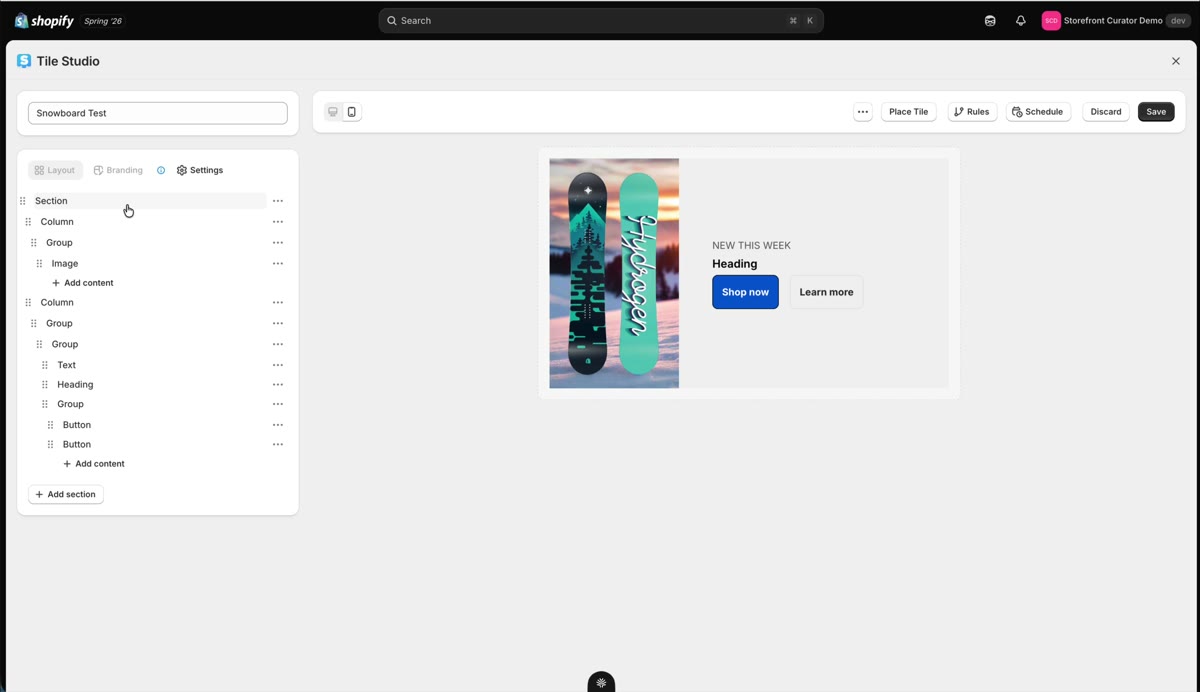
Every tile is built from a small set of layout elements. Once the vocabulary clicks, the whole editor makes sense.
The vocabulary
- Section: think of it as a row. It controls how many Columns sit inside and how they share the width.
- Column: a vertical slice of a Section. Spacing, padding, and appearance apply per Column.
- Group: the flow controller. A Group decides whether its contents sit side by side (inline) or stack vertically, and it is the only element with that switch.
- Box: the base container when you want to get granular.
You can move elements by dragging their handle or from the row's ⋯ menu, duplicate them, or delete them from the tree.
Moving things between levels
Drag a row by its handle and a line shows where it will land. Move the pointer a little to the right to put the row inside the row above it (the line indents), or to the left to lift it out of its group (the line steps back). Every row's ⋯ menu offers the same moves one step at a time: Move up, Move down, Move out of the group, and Move into the row above. Only moves the layout can hold are offered, so a button cannot land inside a heading and content always sits in a Column, a Group or a Box.
Why you sometimes nest on purpose
Nesting an element inside a Group buys you settings the element does not have on its own. An image by itself has no display toggle, but a Group does; put the image in a Group and you can hide or show it per device (that trick is the heart of mobile and desktop layouts). StoCu builds on what Shopify's customer account platform exposes, so where a setting lives occasionally surprises you; the workarounds are built in, and nesting is the main one to know.