Templates and layout starters
Skip the blank canvas: the template gallery and Tile Studio starters give you a finished starting point you can edit.
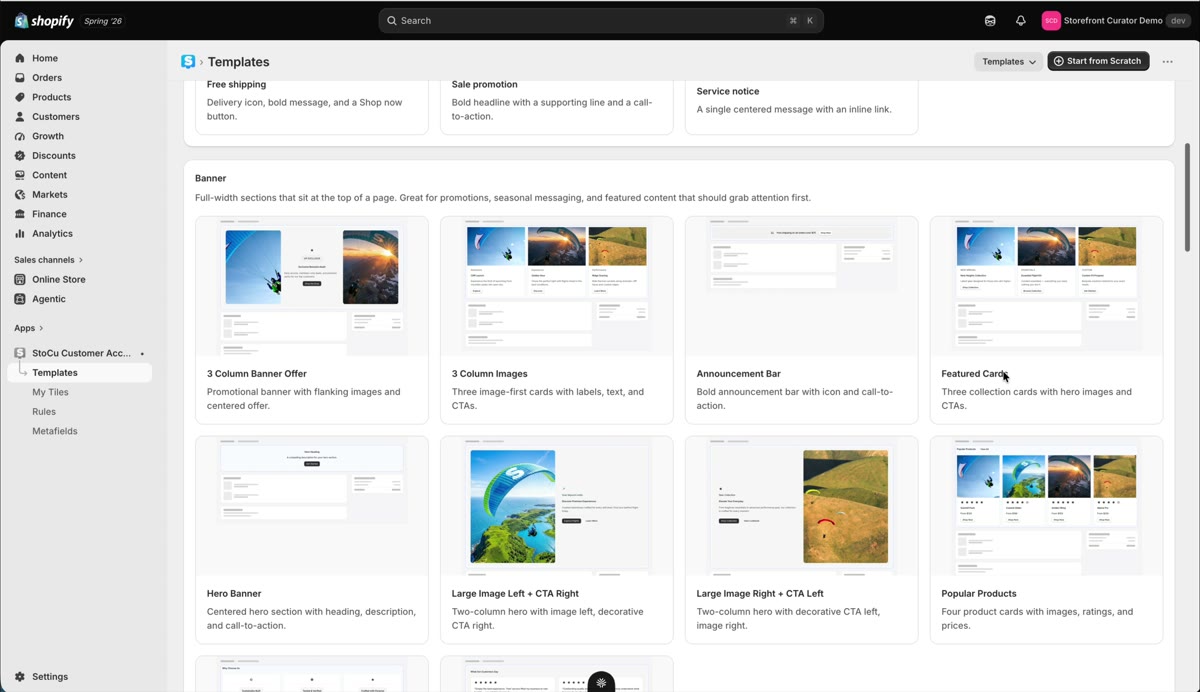
The fastest way to a good-looking tile is to not start from zero. StoCu gives you two flavors of head start.
The template gallery
Templates is its own item in the left navigation. The gallery is organized by where the design fits:
- Announcement bars for attention at the top of a page
- Banners and main content and features for the body
- Sidebar designs, formatted for smaller areas
- Inline designs, meant to slot between other content
- Full-page designs, the foundation for custom pages
Click any design to preview it; if you like it, hit Use template and it becomes a regular, fully editable tile in your library.
Tile Studio starters
A new tile opens in guided setup. If you would rather pick a layout and build by hand, switch the new, empty tile to Advanced and you will see the starters: product grids in three or four columns, hero plus sections, plain column layouts, and sidebar arrangements. They set up the structure so you can go straight to content.
Your own templates
Any tile can become a template. Open it in Tile Studio, open the ⋯ menu and choose Save as Template. It appears under My templates on the Templates page, a simple list of names. Click a name to start a new tile from it, and use Delete to remove one you no longer need. A template saves the tile's Default; variations are not carried over.